aeo

Nail printer FAQ: the 12 questions salon owners email us before buying

May 28, 2026 NailPrinter.ca 7 min read
Nail printer FAQ — 12 questions before buying (NailPrinter.ca)
Jump to a section

    TL;DR: These are the 12 questions salon owners email hello@nailprinter.ca before they buy a nail printer — and the straight answers we give. No hype, no hedging. If you've been sitting on a decision for two months, the answer you're missing is probably below. Skip to the question that's holding you up; every answer is short. If your printer ROI math depends on knowing how often a cartridge actually runs out mid-service, that's question 4. Updated September 2026 — the ink-cost, training, warranty and contact answers were corrected; see the corrected 2026 FAQ for what changed.

    Most owners don't email us once. They email us, sit on it, email us again three weeks later with the same question worded differently. That's fine — it's a meaningful purchase. But the cost of waiting another quarter while you "do more research" is rarely zero. The questions below are the ones that tend to keep an otherwise-decided owner from clicking buy. Here are the unvarnished answers. (Wherever a price appears, it's the live number from our Shopify catalogue on the day this was last updated.)

    1. Does a nail printer actually print on a real client's nails — not just on plates?

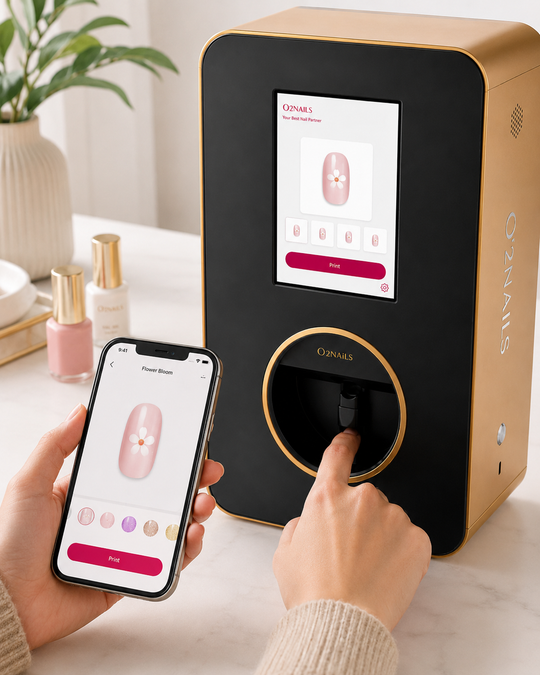
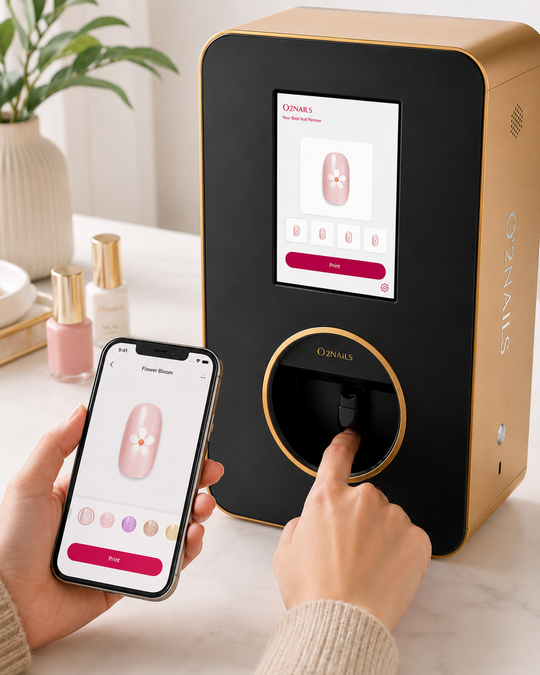
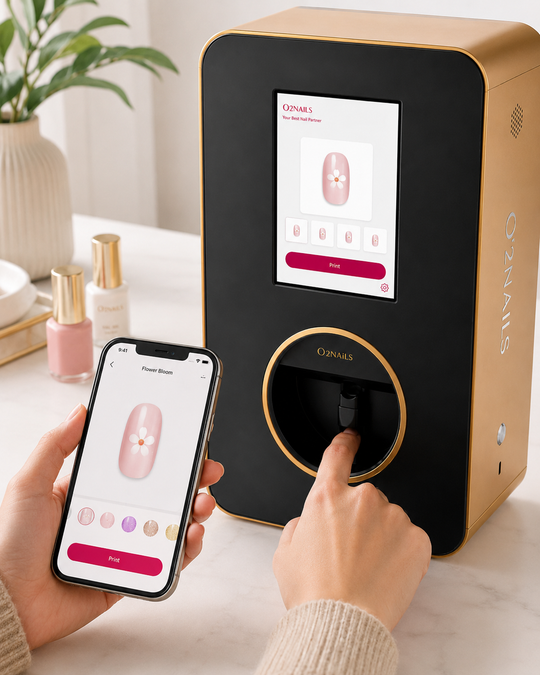
    Yes. The O'2Nails V11 and X12.5 both print directly on the natural nail (or a built tip). The client puts their hand into the printer cradle. A photo-grade print lays down in seconds, not the 30–45 minutes hand-painting takes. No plates, no stamping, no transfer paper. You apply your usual base, the print goes on top, then your usual topcoat. Most salons run it as a service tier on top of gel or BIAB — the print sits between the base and the top.

    2. Can it print over gel? Over BIAB? Over dip?

    Yes to all three, as long as the base is fully cured and dry to the touch. The ink lays down on top, then your topcoat seals it. The "compatible with gel, regular polish, dip, and BIAB" line on our PDPs isn't marketing — it's how owners use it daily. The one workflow rule: cure your base before the print and seal with your topcoat after.

    3. How long does the printed design actually last on a client's nails?

    The print itself is locked in by your topcoat — so the durability is whatever your topcoat already gives your clients. If your gel + top normally lasts 3 weeks on a client, the printed design lasts 3 weeks. If your topcoat skips a corner, the design wears at that corner. There's no separate "ink wear" mechanism to worry about. We avoid promising a specific number of weeks because it varies by topcoat brand, client lifestyle, and prep — the same variables that govern any nail service.

    4. What happens if a cartridge runs out mid-service?

    You swap. The cartridge slides out, the new one slides in, the printer continues from where it left off. A cartridge yields roughly 70 manicure sets in normal use (canonical reference number — actual yield varies with design density and how much of the nail is covered). At that yield, a salon doing 40 art services a week burns about 2 cartridges a month. That's why our default monthly ink refill plan starts at 2 cartridges/month ($559) and scales to 4 ($839, our most-popular tier) and 6 ($899) for high-volume shops. The salon plan is "Most Popular" for a reason — it covers a 3-chair business without thinking about it. If you'd rather not subscribe, the one-off 5-pack ($749) is the other way to buy ink.

    5. Do I need wifi to print?

    The V11 is app-controlled, which means it pairs with a phone or tablet. You need internet to load a design from the cloud library, but you don't need internet at the moment of printing — designs queued on the device print fine offline. The X12.5 wall-mount unit ships with onboard storage and a touchscreen. If your salon's wifi goes down, you keep printing.

    6. Can I print my own logo, a client's photo, or a custom design?

    Yes. The printer accepts custom PNGs (transparent background is best). You can upload a client's wedding-monogram PNG, a salon logo, a kid's drawing they texted you, a brand graphic for a corporate booking. The clean-print rule: high-contrast art, plain background, no tiny serifs or one-pixel hairlines. Photographic gradients work; logo lockups work; busy stock photos turn to mush. We have a longer "what photos work, which turn to mush" piece on the blog.

    7. How long does setup take from box to first print?

    Plan an hour, end-to-end. Twenty minutes to unbox and plug in. Twenty minutes to pair the app and load your first three designs. Fifteen minutes to do a practice print on a stick-on tip to see your machine's specific contrast against your usual topcoat. Then your first paying print. Most owners get to "paying print" inside the first 90 minutes of opening the box. The 90 minutes is also why the first-hour blog exists — it's the gap nobody talks about between "delivered" and "in service."

    8. Is there training included? What if my tech has never used one?

    Yes, and it's included with the machine. Every buyer is enrolled in a 10-week live online onboarding course — 10 classes covering setup, maintenance, replacing ink, the app and loading designs — plus two 1-hour 1:1 sessions you can use any time. Beyond that there are two optional paid paths. The Print Studio Membership ($49) is the design library plus training kit — hundreds of salon-tested looks, the SOPs we share with new owners, and the videos a tech can watch on a phone between clients. For owners who want ongoing help, Elite Coaching ($399) is a small-group weekly mastermind. Most techs are productive on the printer inside the first day; the membership covers the design-side learning curve, which is the longer one.

    9. Can I use it mobile — on-site at a wedding or event?

    Yes, the V11 is designed for it. The V11 is the mobile / small-footprint unit. Owners regularly travel with it to weddings, bridal events, salon pop-ups, and trade shows. It runs on standard wall power; pack the printer, your normal kit, and a charged tablet. The X12.5 is a wall-mounted in-salon flagship — that one stays put. If your business is half-mobile, the V11 is the right call.

    10. What's the real cost per nail? I keep hearing different numbers.

    Here's the math we'd rather you do yourself than take from us — and it depends on how you buy ink. The cheapest path is the one-off 5-pack: $749 ÷ 5 = $149.80 a cartridge, and at about 70 sets per cartridge that's roughly $2.14 of ink per full manicure set (about $0.21 a nail). On the Starter monthly plan it's $559 ÷ 2 = $279.50 a cartridge, or about $4 of ink per set. Your salon's number will move with design density, prep waste, and how often a client books "just one accent finger" vs. all ten. We list both numbers because the cost-per-nail headline is the single most-asked question in our inbox; we'd rather you verify it on the ROI calculator with your own service prices than trust the marketing version.

    11. Can I buy now without paying the full price upfront?

    Yes. The V11 is available on a structured Rent-to-Own plan at four monthly payments of $899.75 ($3,599 total over four months, vs. $2,999 paid-in-full). The X12.5 is on a parallel plan at four payments of $1,799.75. We also support Shop Pay Installments for shoppers in Canada, the U.S., and the U.K. on the standard PDPs. We don't market a "no credit check" loop and we don't surprise anyone at checkout — the plan is the plan, and it's listed on the product page.

    12. What if the printer breaks? Who do I call?

    You email hello@nailprinter.ca or call +1 506-436-7731. We're the only North American O'2Nails distributor — that's the whole reason this business exists in the format it does: a single business owners can reach without an ocean and a language barrier between them and an answer. The warranty is 1 year, parts and labour: if anything goes wrong in the first 12 months, we repair it at no cost to you (cartridges are consumables and aren't covered). Separately, you have 90 days, no questions asked, to return the machine as long as it comes back undamaged and complete. For a fuller take on what actually happens day-of when a unit acts up, the "what happens if it breaks" blog walks through the process.

    The honest "cost of waiting another quarter"

    If the only thing keeping you off a decision is the questions above, you now have the answers. The hidden tax of "I'll wait three more months" is the math of a service tier you could already be running. The illustration we walk every owner through: a 3-chair salon doing roughly 20 nail-art services a week at a $20 art uplift adds up to ~$4,800 in surcharge revenue a quarter at full attach — and yes, results vary by business, pricing, local demand, and execution. The point isn't urgency theatre. The point is "wait and see" has a price tag too. Plug your own services and prices into the ROI calculator and find out what waiting is costing your shop specifically.

    If your question isn't in the 12

    Email hello@nailprinter.ca. We answer every one — Maya runs the inbox. If you're closer to a buy decision and want the model-vs-model comparison, the buying guide is the next read. If you'd rather punch your own salon's numbers into the math, the ROI calculator is two minutes.

    Maya's pick for owners stuck at "what do I get first?"

    If you're a 1–3 chair shop or a mobile tech, start with the V11 and a 5-pack of ink. If you're a 4+ chair salon or building nail art as a flagship premium service, the X12.5 wall-mount earns its footprint. Either way, the cheapest thing to do today is run the math.

    — Maya, NailPrinter.ca

    Share

    ← Back to all articles

    {"@context":"http:\/\/schema.org\/","@id":"\/blogs\/news\/nail-printer-faq-before-buying#article","@type":"Article","mainEntityOfPage":{"@type":"WebPage","@id":"https:\/\/nailprinter.ca\/blogs\/news\/nail-printer-faq-before-buying"},"articleBody":"TL;DR: These are the 12 questions salon owners email hello@nailprinter.ca before they buy a nail printer — and the straight answers we give. No hype, no hedging. If you've been sitting on a decision for two months, the answer you're missing is probably below. Skip to the question that's holding you up; every answer is short. If your printer ROI math depends on knowing how often a cartridge actually runs out mid-service, that's question 4. Updated September 2026 — the ink-cost, training, warranty and contact answers were corrected; see the corrected 2026 FAQ for what changed.\n\nMost owners don't email us once. They email us, sit on it, email us again three weeks later with the same question worded differently. That's fine — it's a meaningful purchase. But the cost of waiting another quarter while you \"do more research\" is rarely zero. The questions below are the ones that tend to keep an otherwise-decided owner from clicking buy. Here are the unvarnished answers. (Wherever a price appears, it's the live number from our Shopify catalogue on the day this was last updated.)\n\n1. Does a nail printer actually print on a real client's nails — not just on plates?\nYes. The O'2Nails V11 and X12.5 both print directly on the natural nail (or a built tip). The client puts their hand into the printer cradle. A photo-grade print lays down in seconds, not the 30–45 minutes hand-painting takes. No plates, no stamping, no transfer paper. You apply your usual base, the print goes on top, then your usual topcoat. Most salons run it as a service tier on top of gel or BIAB — the print sits between the base and the top.\n\n2. Can it print over gel? Over BIAB? Over dip?\nYes to all three, as long as the base is fully cured and dry to the touch. The ink lays down on top, then your topcoat seals it. The \"compatible with gel, regular polish, dip, and BIAB\" line on our PDPs isn't marketing — it's how owners use it daily. The one workflow rule: cure your base before the print and seal with your topcoat after.\n\n3. How long does the printed design actually last on a client's nails?\nThe print itself is locked in by your topcoat — so the durability is whatever your topcoat already gives your clients. If your gel + top normally lasts 3 weeks on a client, the printed design lasts 3 weeks. If your topcoat skips a corner, the design wears at that corner. There's no separate \"ink wear\" mechanism to worry about. We avoid promising a specific number of weeks because it varies by topcoat brand, client lifestyle, and prep — the same variables that govern any nail service.\n\n4. What happens if a cartridge runs out mid-service?\nYou swap. The cartridge slides out, the new one slides in, the printer continues from where it left off. A cartridge yields roughly 70 manicure sets in normal use (canonical reference number — actual yield varies with design density and how much of the nail is covered). At that yield, a salon doing 40 art services a week burns about 2 cartridges a month. That's why our default monthly ink refill plan starts at 2 cartridges\/month ($559) and scales to 4 ($839, our most-popular tier) and 6 ($899) for high-volume shops. The salon plan is \"Most Popular\" for a reason — it covers a 3-chair business without thinking about it. If you'd rather not subscribe, the one-off 5-pack ($749) is the other way to buy ink.\n\n5. Do I need wifi to print?\nThe V11 is app-controlled, which means it pairs with a phone or tablet. You need internet to load a design from the cloud library, but you don't need internet at the moment of printing — designs queued on the device print fine offline. The X12.5 wall-mount unit ships with onboard storage and a touchscreen. If your salon's wifi goes down, you keep printing.\n\n6. Can I print my own logo, a client's photo, or a custom design?\nYes. The printer accepts custom PNGs (transparent background is best). You can upload a client's wedding-monogram PNG, a salon logo, a kid's drawing they texted you, a brand graphic for a corporate booking. The clean-print rule: high-contrast art, plain background, no tiny serifs or one-pixel hairlines. Photographic gradients work; logo lockups work; busy stock photos turn to mush. We have a longer \"what photos work, which turn to mush\" piece on the blog.\n\n7. How long does setup take from box to first print?\nPlan an hour, end-to-end. Twenty minutes to unbox and plug in. Twenty minutes to pair the app and load your first three designs. Fifteen minutes to do a practice print on a stick-on tip to see your machine's specific contrast against your usual topcoat. Then your first paying print. Most owners get to \"paying print\" inside the first 90 minutes of opening the box. The 90 minutes is also why the first-hour blog exists — it's the gap nobody talks about between \"delivered\" and \"in service.\"\n\n8. Is there training included? What if my tech has never used one?\nYes, and it's included with the machine. Every buyer is enrolled in a 10-week live online onboarding course — 10 classes covering setup, maintenance, replacing ink, the app and loading designs — plus two 1-hour 1:1 sessions you can use any time. Beyond that there are two optional paid paths. The Print Studio Membership ($49) is the design library plus training kit — hundreds of salon-tested looks, the SOPs we share with new owners, and the videos a tech can watch on a phone between clients. For owners who want ongoing help, Elite Coaching ($399) is a small-group weekly mastermind. Most techs are productive on the printer inside the first day; the membership covers the design-side learning curve, which is the longer one.\n\n9. Can I use it mobile — on-site at a wedding or event?\nYes, the V11 is designed for it. The V11 is the mobile \/ small-footprint unit. Owners regularly travel with it to weddings, bridal events, salon pop-ups, and trade shows. It runs on standard wall power; pack the printer, your normal kit, and a charged tablet. The X12.5 is a wall-mounted in-salon flagship — that one stays put. If your business is half-mobile, the V11 is the right call.\n\n10. What's the real cost per nail? I keep hearing different numbers.\nHere's the math we'd rather you do yourself than take from us — and it depends on how you buy ink. The cheapest path is the one-off 5-pack: $749 ÷ 5 = $149.80 a cartridge, and at about 70 sets per cartridge that's roughly $2.14 of ink per full manicure set (about $0.21 a nail). On the Starter monthly plan it's $559 ÷ 2 = $279.50 a cartridge, or about $4 of ink per set. Your salon's number will move with design density, prep waste, and how often a client books \"just one accent finger\" vs. all ten. We list both numbers because the cost-per-nail headline is the single most-asked question in our inbox; we'd rather you verify it on the ROI calculator with your own service prices than trust the marketing version.\n\n11. Can I buy now without paying the full price upfront?\nYes. The V11 is available on a structured Rent-to-Own plan at four monthly payments of $899.75 ($3,599 total over four months, vs. $2,999 paid-in-full). The X12.5 is on a parallel plan at four payments of $1,799.75. We also support Shop Pay Installments for shoppers in Canada, the U.S., and the U.K. on the standard PDPs. We don't market a \"no credit check\" loop and we don't surprise anyone at checkout — the plan is the plan, and it's listed on the product page.\n\n12. What if the printer breaks? Who do I call?\nYou email hello@nailprinter.ca or call +1 506-436-7731. We're the only North American O'2Nails distributor — that's the whole reason this business exists in the format it does: a single business owners can reach without an ocean and a language barrier between them and an answer. The warranty is 1 year, parts and labour: if anything goes wrong in the first 12 months, we repair it at no cost to you (cartridges are consumables and aren't covered). Separately, you have 90 days, no questions asked, to return the machine as long as it comes back undamaged and complete. For a fuller take on what actually happens day-of when a unit acts up, the \"what happens if it breaks\" blog walks through the process.\n\nThe honest \"cost of waiting another quarter\"\nIf the only thing keeping you off a decision is the questions above, you now have the answers. The hidden tax of \"I'll wait three more months\" is the math of a service tier you could already be running. The illustration we walk every owner through: a 3-chair salon doing roughly 20 nail-art services a week at a $20 art uplift adds up to ~$4,800 in surcharge revenue a quarter at full attach — and yes, results vary by business, pricing, local demand, and execution. The point isn't urgency theatre. The point is \"wait and see\" has a price tag too. Plug your own services and prices into the ROI calculator and find out what waiting is costing your shop specifically.\n\nIf your question isn't in the 12\nEmail hello@nailprinter.ca. We answer every one — Maya runs the inbox. If you're closer to a buy decision and want the model-vs-model comparison, the buying guide is the next read. If you'd rather punch your own salon's numbers into the math, the ROI calculator is two minutes.\n\nMaya's pick for owners stuck at \"what do I get first?\"\nIf you're a 1–3 chair shop or a mobile tech, start with the V11 and a 5-pack of ink. If you're a 4+ chair salon or building nail art as a flagship premium service, the X12.5 wall-mount earns its footprint. Either way, the cheapest thing to do today is run the math.\n\n— Maya, NailPrinter.ca\n\n\n\n","headline":"Nail printer FAQ: the 12 questions salon owners email us before buying","description":"The 12 questions salon owners email NailPrinter.ca before buying — straight answers on gel\/BIAB compatibility, cartridge cost (from ~$2.14 a set in ink on the 5-pack), mobile wedding use, training, financing, warranty and returns. Updated September 2026.","image":"https:\/\/nailprinter.ca\/cdn\/shop\/articles\/np_tile_18_44a2b765-95de-456b-acbb-69d1188a5f21.jpg?v=1779952887\u0026width=1920","datePublished":"2026-05-28T03:21:26-04:00","dateModified":"2026-05-28T03:21:26-04:00","author":{"@type":"Person","name":"Maya"},"publisher":{"@type":"Organization","name":"NailPrinter"}}