Here's the thing nobody tells you when you're considering a nail printer: the machine doesn't restructure your menu. You do. And if you skip that step, you'll have a faster salon — not a more profitable one.
Salon owners add an O'2Nails V11 or X12.5, keep their existing service list mostly intact, and wonder why the revenue bump isn't as dramatic as they expected. The printer works. The math didn't change. Here's why — and what to do differently.
What does a nail printer actually do for a salon's revenue?
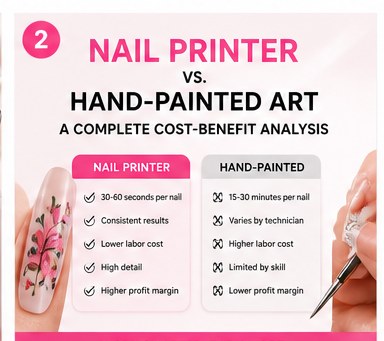
A nail printer is a throughput tool. It removes the biggest single time constraint in nail art services: the painting itself. The V11 prints a full set in seconds (nail by nail); the X12.5 runs photo-grade prints in ~38 seconds per nail. Either way, you're eliminating 25–40 minutes of hand-painting from a service that used to take an hour.
That's real. But "faster" only becomes "more money" when you make two deliberate decisions: what to charge for the speed, and what to do with the time you got back.
Most salon menus don't reflect either of those decisions. They price printed nail art at the same rate as hand-painted nail art — or even less, because "the machine does it." And the freed-up 30 minutes per appointment either gets absorbed into the same schedule or the tech rushes into a poorly-priced second client. The machine runs. The money doesn't move.
Why does this happen? The menu structure most salons start with
The default approach: add a line that says something like "Nail Art — $20–$40 add-on." The printer handles the designs. The price mirrors what you charged for hand-painted art before. Maybe slightly less, because it "feels like cheating" to charge the same for machine-assisted work.
This is backwards. The machine is a real business cost — starting at $2,999 CAD. The ink runs at roughly $2–$4 per full manicure set in consumables, depending on your plan. Charging the same or less for a higher-quality, higher-consistency product isn't a value play — it's margin compression.
The salon owners who see a meaningful revenue lift do something different with their menu. They don't add a line; they add a tier.
What does a menu tier actually mean?
A tier is a distinct service offering at a distinct price point, aimed at a distinct customer. It's not "nail art for $35." It's:
- Express Printed Set — full set with 5,000+ catalog designs, 30–40 min appointment, priced at your standard gel/polish rate plus a design premium (typically $15–$25 over base).
- Custom Photo Nail Session — client-supplied image (pet, partner, logo, wedding photo) printed to their nail; premium appointment block, $60–$90+ for a full set depending on your market.
- Event / Occasion Set — Canada Day, wedding party, prom, graduation; themed design packs, group-booking structure, high volume. The printer handles throughput; you handle the upsell.
Three tiers, three price points, three client conversations. The machine enables all of them. The menu makes them real.
The ROI math most salons skip before they buy
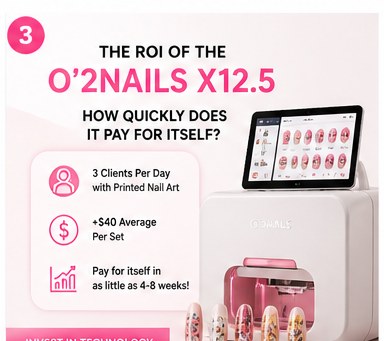
A V11 at $2,999 CAD, servicing clients at a $25 design premium per appointment: you're looking at 120 appointments to break even on the machine alone. At 5 print appointments per week, payback is roughly 24 weeks — six months. That's a reasonable return.
But if you price printed nail art the same as your existing services and see no volume change, the payback stretches indefinitely. It's not that the printer doesn't work. It's that the business case was never completed.
The NailPrinter.ca ROI calculator runs this math for your specific situation — your service mix, your average ticket, your volume. Plug in your numbers before you build the business case, or before you restructure the menu around a machine you've already got. Results vary by business, pricing, local demand, and execution.
What about the summer event window?
Canada Day is just over a week away. Wedding season runs May through September. Back-to-school follows in August. These aren't just themed design opportunities — they're booking windows where clients are motivated to spend on something special, and group events (bridal parties, grad nights) create multi-client sessions that make a high-throughput machine genuinely earn its place on your floor.
If your menu has a Custom Photo or Event Set tier with a group rate, you're positioned to capture that volume. If it doesn't, the machine sits idle during its most commercially valuable weeks of the year.
Which machine fits the menu you're building?
The O'2Nails V11 ($2,999 CAD) is the right starting point for most salons — compact footprint, mobile-friendly for events, handles any client in a standard appointment block. The O'2Nails X12.5 ($5,999 CAD) is the multi-chair upgrade: wall-mount, photo-grade in ~38 seconds, built for dedicated nail-print stations running at volume.
The question isn't which machine is better. It's which one fits the menu you're building. A V11 in a mobile tech's kit and an X12.5 in a dedicated salon station require different service structures and different pricing for the same client base. NailPrinter.ca is the official and only North American O'2Nails distributor.
What the menu restructure actually looks like
We covered the pricing framework in detail in a recent post. The short version:
- Audit your existing nail art pricing. What you charge for hand-painted designs is your floor, not your ceiling, for printed art.
- Build three tiers. Express, Custom, Event — one per client segment.
- Know your consumable cost baseline. At the Starter ink plan ($559/mo ÷ 2 cartridges = $279.50/cart ÷ ~70 sets ≈ ~$4/set — a labeled assumption based on typical yield, not a guarantee), you're not selling $4 of ink. You're selling design, consistency, and speed.
- Set a per-tier minimum appointment value that makes the machine's ROI visible within a defined time window.
- Run 90 days, then review — average ticket by tier and booking rate per tier tell you what to adjust next.
The printer didn't fail. The menu was never restructured to use it. Those are different problems — and only one of them has to do with the hardware. You know what I mean.
Run your numbers first. The ROI calculator at nailprinter.ca takes five minutes and shows you exactly what the machine needs to earn per week to justify its place on your salon floor.
— Maya
NailPrinter.ca · hello@nailprinter.ca · Official and only North American O'2Nails distributor